
Notes # 14: FIFA World Cup 2026, Easy Language In Ukraine, Trump vs. Accessibility...
Created while listening: Boards Of Canada – Inferno
Personal Notes
Last week, there was a long “bayram” holiday in Turkey. During the week, nearly everyone was on the road for a seaside vacation, cultural tours, or family visits. My wife and I also traveled to a small seaside village to visit our family. This was a calm and nice holiday until the last day. We didn’t buy our tickets for returning to Istanbul and tried to find them on the last day. Unfortunately, due to huge travel circulation during the bayram, flight tickets were sold out and there were limited bus seats available. We realized that we had to buy a ticket whenever we saw an available seat and had to complete the ticketing process as quickly as possible.
However, the seat selection screens were so poorly designed that we couldn’t understand which seats were sold and which were available easily. I really experienced the importance of contrast firsthand. Contrast errors did not directly block me from taking action, but they decreased my speed significantly. This is not only a UX issue in these kinds of busy situations, but also a critical blocker when I need to complete something quickly. That’s why I wrote an “In Detail” section exemplifying our experience below.
News
FIFA World Cup 2026 To Feature Sign Language Interpretation For All Matches, Additional Accessible Experiences To Help All Fans Enjoy The Global Showcase
Source: FIFA
In the FIFA World Cup 2026, “sign language broadcasts will be available for every match, allowing fans both inside and outside the stadium to follow the action and excitement through play-by-play coverage and interpretation of key audio cues.” To view American Sign Language interpretation of each game, the FIFA World Cup App should be downloaded, and a YouTube link can be found in the stadium’s accessibility services tab. The good thing is that you can benefit from this service from anywhere. There will also be audio description available through the FIFA Audio Description App. I tried to use the audio description last year during the FIFA Club World Cup, but in the app, you have to enter an event code. I see that a similar “event code” issue exists this year as well. So, I think you have to be in the stadium to benefit from audio description. I couldn’t understand why accessing audio description is not as easy as accessing sign language interpretation.
Cabinet Introduces Unified Approach To Evaluating Accessibility And Clarity Of Government Information
Source: Interfax
The Ministry of Culture of Ukraine presented an amendment recommending that government bodies present information in simple and understandable language, with a unified approach to assessing the accessibility and clarity of information. It is expected that government bodies will conduct an annual self-assessment of their communications with citizens and submit the results to the Ministry of Culture. I am wondering about the approach and self-assessment methodology. These kinds of guidelines and materials are valuable where easy language standards are still under discussion.
National Federation Of The Blind Sues Trump-Vance Administration Over Delays To Critical Website Accessibility Protections
Source: Democracy Forward
In previous Notes, I mentioned that the Section 504 and ADA Title II digital accessibility rule deadlines were postponed. The National Federation of the Blind filed a lawsuit. “The lawsuit challenges actions by the U.S. Department of Justice (DOJ) and the U.S. Department of Health and Human Services (HHS) that postponed long-anticipated compliance deadlines under federal disability rights laws without public notice or input. (…) The National Federation of the Blind is asking the court to block the delays and restore the original accessibility compliance deadlines.”
Inspirations
Digital Accessibility Workshop
Source: Colorado Governor’s Office Of Information Technology
The Digital Accessibility Workshop includes interactive exercises across nine different topics that show how people with disabilities experience the digital environment. This is a good resource to see what accessibility is. There are different resources in the workshop, such as dyslexia simulators in the language section, color simulators in the vision and color section, and quizzes that you can interact with.
Building A General-Purpose Accessibility Agent—And What We Learned In The Process
Source: GitHub Blog
A great “what we learned” article. GitHub is piloting an accessibility agent to provide engineers with reliable answers to accessibility questions and automatically catch and remediate simple accessibility issues before production. The agent has proven to be most effective when trained on manually audited issues specific to the platform, efficient with token consumption through sub-agents, and more accurate when following methodical instructions and using preformatted templates. GitHub plans to open source the agent.
La Carte Blanche: A Project Definition Framework To Avoid Chaos
Source: Stephanie Walter
This is not directly a digital accessibility piece, but I love this kind of framework for facilitating “big” discussions like vision and definition of a project. To define a project, you have to fill 6 blanks in La Carte Blanche created by Stéphanie Walter: “My project is… , My users are… , They struggle with… , It helps them… , They use it when… , It’s a success if…” This framework can also be used for defining project goals for accessibility, like this: “My project is an e-commerce mobile app’s ordering feature, My users are blind people, They struggle with navigating the app with their screen reader, It helps them to order things independently, They use it when they want to order something quickly, It’s a success if a blind user can order something as fast as a non-assistive-technology user.”
In Detail: Common Accessibility Failures In The Seat Maps
Read this article on its own page
During the holiday period I visited the websites of about ten bus companies and examined their seat maps. As far as I can see, the biggest design problem is the requirement to display occupied seats for women and men in different colors. This is because if you do not purchase a ticket as a pair, you cannot sit next to a passenger of different gender. Below I list the most frequently encountered issues with screenshots:
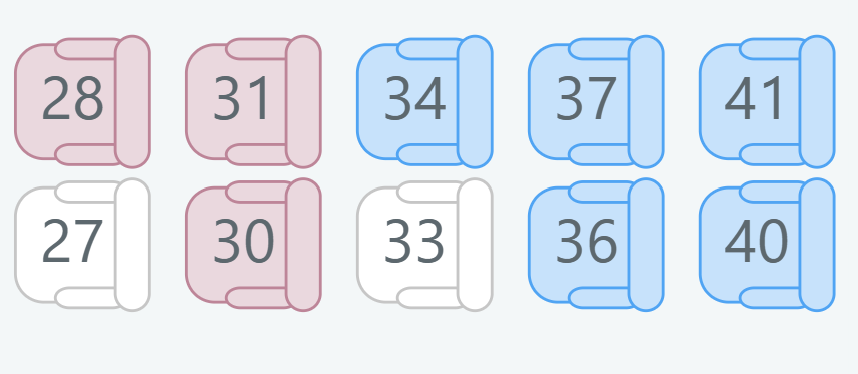
- Empty-Seat / Occupied-Seat Contrast: Seats occupied by men are usually shown in light blue. However, as can be seen in the example below, the light-blue is very close to the white used for empty seats. The contrast between the two is below the 3:1 ratio, making it especially hard to tell which seats are free or taken when trying to book from a mobile device.
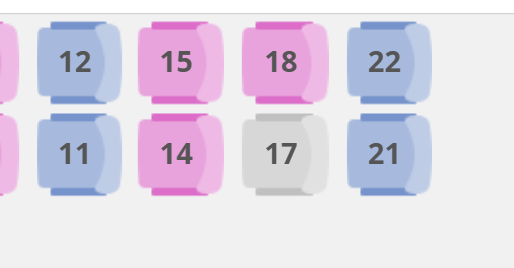
- Gender Contrast: The pink used for seats occupied by women and the blue used for seats occupied by men are generally very similar. In the example below this similarity is exaggerated. I cannot determine whether the empty seat number 17 can be taken by a woman or a man. The distinguishability of the blue and pink colors should also meet a 3:1 contrast requirement.
- Blurry Icons: Using icons instead of colors to indicate gender would be a safer approach. However, in the example below the icons are so blurry and hard to differentiate that they do not solve the problem. On small screens it is especially difficult to tell which icon represents a woman and which represents a man.
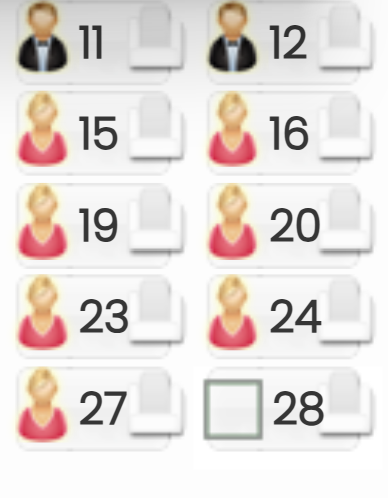
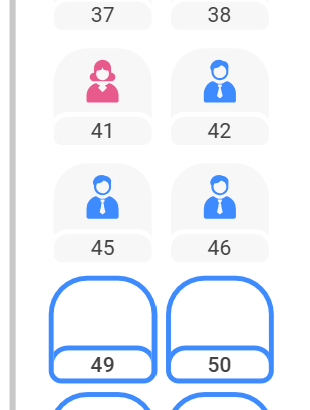
- Small Icons: The use of minimalist icons supported by colors is a good practice. Consequently, the most accessible seat map I have seen is shown below. Nevertheless, I would prefer larger icons and additional distinguishing elements, such as longer hair for woman icons.
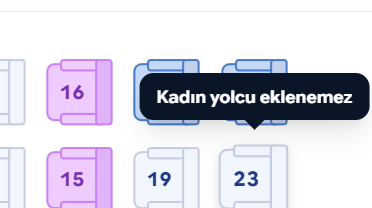
- Are Tooltips Sufficient?: Showing a tooltip when the mouse hovers over or a tap lands on an empty seat is a commonly used technique and it does provide some benefit. However, it does not resolve the issues encountered on mobile devices.
Get each issue by email
New notes, news and an album recommendation, straight to your inbox. Free, and you can unsubscribe anytime.
You will get a confirmation email first. Subscriptions are handled by Buttondown.