
Notes # 9: Deadline Extensions In The US, GAAD Accessibility Pledge, Font Accessibility Checks...
Created while listening: Friko – Something Worth Waiting For
Personal Notes
My mother broke her arm last week and she is now experiencing a temporary disability. As a tile artist, she can not work at the moment. Driving, cooking, and sending text messages are among the tasks that have become difficult for her. When I visited my family in the weekend, I noticed that one of her most frequently used phrases during this period is “Of course I can do it.” This is because my father asks her “Can you do that?” kind of questions and tries to help her with almost every task. I started asking the same annoying “Can you do that?” questions as well.
It is interesting because, during my high‑school years, I reacted very aggressively to such questions. Whenever they asked about my capabilities, I would become very angry, and fights would break out at home each time. For now, I begin to understand why they ask these “Can you do that?” questions. Although it may seem like a lack of trust, it is actually about being in the same family. I did the same thing to my mother as a person working in the field of disability for many years.
In any case, the answer is always the same: “Of course I can do it.” You can wait; a person will call you when help is needed. Do not keep asking for help over and over.
News
Trump Administration Casts Doubt On New ADA Rules
Source: Disability Scoop
In Notes # 4, I mentioned about the Department of Justice’s interim final rule for ADA Title II. A deadline extension was a possibility a few weeks ago, but unfortunately it has now become a reality. The DOJ finalized the ADA Title II rule in 2024 and gave time to state and local governments until April 24, 2026 to make their digital content and products accessible. However, the deadline has been extended, and the new deadline is April 26, 2027. The agency determined that it “overestimated the capabilities” of covered entities—both in terms of staffing and technology—to comply with the rule on schedule. My experience in Turkey shows me that when deadline extensions begin, laws start to be implemented loosely and their enforcement power weakens. So, sorry for my disabled friends in the US.
Are Your Digital Front Door and Virtual Health Services Accessible?
Source: Holland & Knight
Healthcare providers that receive federal financial assistance must implement digital‑accessibility standards for their website content, mobile apps, and kiosks by May 11 2026, in accordance with Section 504 of the Rehabilitation Act. When a provider is non‑compliant, persons with disabilities can seek relief in federal court through direct legal action. There are a few practical exemptions that make the rule applicable. For example, HHS notes that an acceptable workaround for kiosk inaccessibility is to “allow persons with disabilities to go directly to the personnel at the main desk to register for the necessary services.” However, according to Ken Nakata, same deadline extension like in ADA Title II can be applied for Section 504 rule as well. In Ken Nakata’s words this extension is worse than ADA Title II’s because “the 2024 HHS rule wasn’t codifying existing enforcement practice across the board — it was filling genuine gaps”
Global Accessibility Awareness Day – Accessibility Pledge
Source: Equalize Digital
“Join us in celebrating Global Accessibility Awareness Day (GAAD) by pledging your time to improve accessibility in WordPress. Whether you’re a developer, designer, content creator, or site owner, your skills can help make the internet more usable for millions of people with disabilities. Even one small fix—like adding alt text, fixing heading levels, or improving keyboard navigation—can make a big difference.” I love this kind of call-to-action campaigns rather than purely awareness raising activities.
Inspirations
SUC-o-meter, The New Way To Measure How Bad The App Sucks
Source: Double A
Answering the “What is our accessibility score?” question is one of the most annoying and difficult tasks in the digital‑accessibility field. Google Lighthouse’s score or the number of issues detected by Axe‑core give us only a generic view and can be misleading. Most scoring frameworks treat every issue type at the same level, this is also not the case. The Suc‑o‑meter framework considers both the location of the issue and its severity, producing a single overall score. In the article, the definitions of flows and severity are provided. In this YouTube video, you can see the implementation of the Suc‑o‑meter.
If You Thought The Speed Of Writing Code Was Your Problem - You Have Bigger Problems
Source: Andrew Murphy
An article mentions why using AI for the sake of AI is not meaningful. AI accelerates almost all processes, including the speed of writing code. On the other hand, Andrew Murphy emphasizes that identifying the value stream—in other words, understanding what you are doing and why—is much more important. The article does not explicitly mention accessibility, but I think there is a clear link. Focusing only on output and speed will negatively impact accessibility, and, that’s why, our work is deeply integrated into the value stream. In short, we have to think about processes before we think about outputs.
Adobe Flags Common Fonts Failing Basic Accessibility Tests
Source: ITBrief
Adobe discovered that several widely used typefaces fail basic accessibility checks. Helvetica, Arial, and Gill Sans are among the fonts that did not pass. Designers are advised to test the iIl1 combination, ensure that the letters b, d, p, and q are not too closely mirrored, avoid condensed or ultra‑light fonts for body text, and use larger default text sizes with wider line spacing before selecting a typeface. According to the article, choosing an inaccessible font can raise legal issues when materials are difficult to read and alternative formats are not provided.
In Detail: Why I Choose Six Hands Marker Typeface In Accessibility Notebook?
Read this article on its own page
I don’t use AI when I summarize news and articles for the Accessibility Notebook because I want to read the texts myself and understand their core. I aim to express the sentences in my own words. Creating original content is important to me. While looking for a font that reflects originality and effort, I found the “Six Hands Marker,” which gives a hand‑written feel. Unlike most handwritten fonts, it also has good accessibility. Below are the results of my checks:
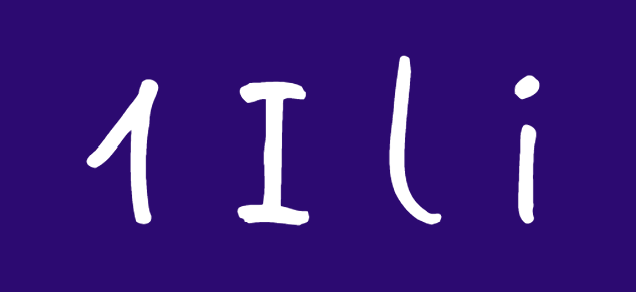
- 1Ili Test: The horizontal lines above and below the capital I, the curved tip of the 1, and the broken lower end of the lowercase l make the characters easy to distinguish.
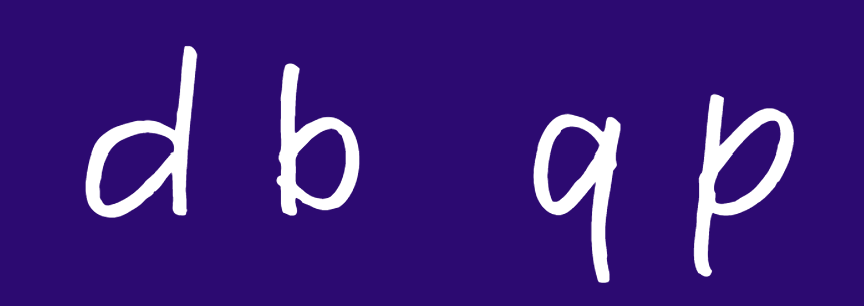
- Mirroring Check: The mirrored characters such as q and p, or d and b, can be easily distinguished from each other.
- Text Spacing: The spacing between characters is not too tight. Overall, it’s a comfortable font to read.
Get each issue by email
New notes, news and an album recommendation, straight to your inbox. Free, and you can unsubscribe anytime.
You will get a confirmation email first. Subscriptions are handled by Buttondown.